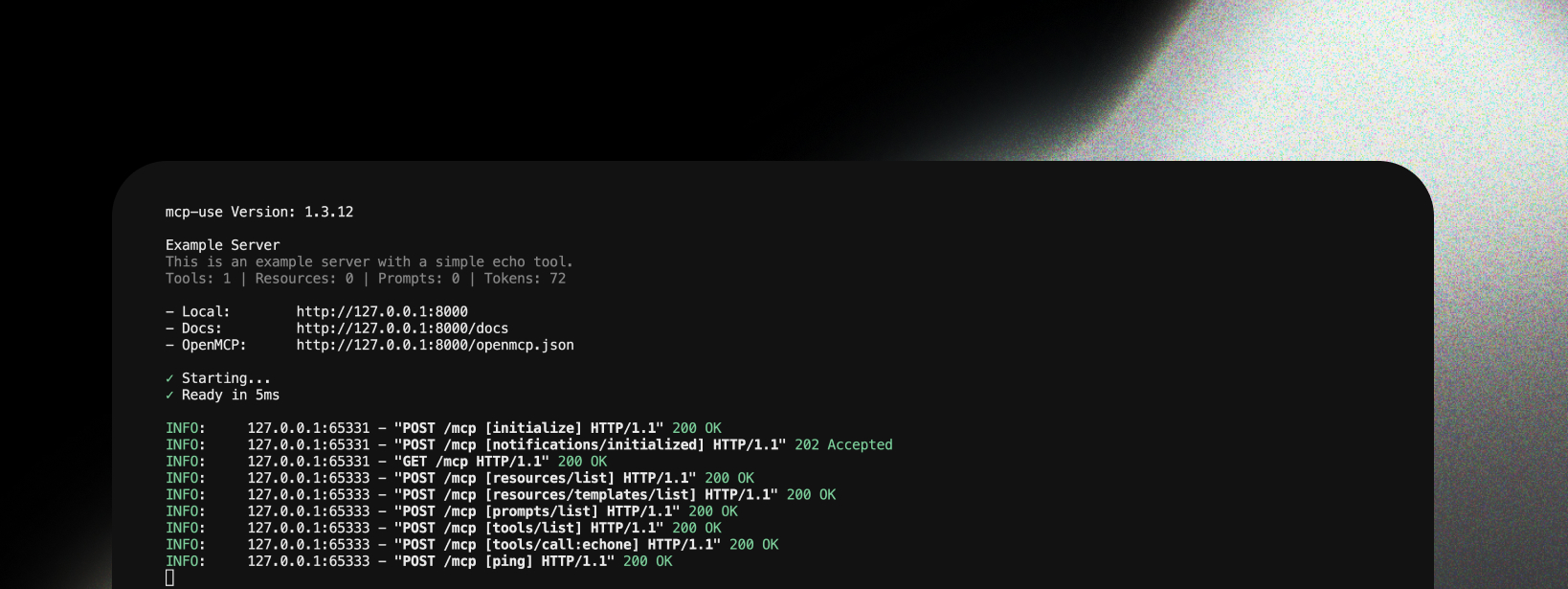
mcp-use provides clean, informative logging about MCP operations, making it easy to understand server activity and debug issues in both production and development.
MCP: prefix to differentiate them from regular HTTP logs.
Why Use MCP-Specific Logging?
This type of logging is essential because:
- Clear visibility into which MCP methods are being called
- Easy debugging of MCP protocol interactions
- Request tracking with session IDs and method names
- Production monitoring of server usage patterns
- Error tracking for tools, resources, and prompts
- Performance insights with execution timing
Log Levels
mcp-use provides three logging modes controlled by the debug parameter and DEBUG environment variable:
Production Logs (Default: debug=False)
Clean, readable logs showing MCP method calls with the MCP: prefix:
MCP:  127.0.0.1:58478 - "POST /mcp [tools/call:search] HTTP/1.1" 200
MCP:  127.0.0.1:58478 - "POST /mcp [resources/list] HTTP/1.1" 200
MCP:  127.0.0.1:58478 - "POST /mcp [initialize] HTTP/1.1" 200
Debug Logs (debug=True)
Same logs as production + development routes (inspector, docs). By default, inspector logs are hidden:
MCP:  127.0.0.1:58478 - "POST /mcp [tools/call:search] HTTP/1.1" 200
INFO: 127.0.0.1:58478 - "GET  /docs HTTP/1.1" 200
Full Debug Logs (DEBUG=2 environment variable)
Same logs as debug mode + JSON-RPC request/response logging:
MCP:  127.0.0.1:58478 - "POST /mcp [tools/call:search] HTTP/1.1" 200
MCP:  [tools/call:search] Request (45.2ms): {"jsonrpc": "2.0", "id": 1, "method": "tools/call", "params": {"name": "search", "arguments": {"query": "test"}}}
MCP:  [tools/call:search] Response: {"jsonrpc": "2.0", "id": 1, "result": {"content": [...]}}
Pretty Print Mode (pretty_print_jsonrpc=True)
For easier debugging, enable pretty-printed JSON-RPC logs with Rich panels:
server = MCPServer("my-server", pretty_print_jsonrpc=True)
MCP:  127.0.0.1:58478 - "POST /mcp [tools/call:search] HTTP/1.1" 200
╭─ tools/call:search Request ─────────────────────── 45.2ms ──╮
│ {                                                           │
│   "jsonrpc": "2.0",                                         │
│   "id": 1,                                                  │
│   "method": "tools/call",                                   │
│   "params": {                                               │
│     "name": "search",                                       │
│     "arguments": {"query": "test"}                          │
│   }                                                         │
│ }                                                           │
╰─────────────────────────────────────────────────────────────╯
╭─ tools/call:search Response ────────────────────────────────╮
│ {                                                           │
│   "jsonrpc": "2.0",                                         │
│   "id": 1,                                                  │
│   "result": {"content": [...]}                              │
│ }                                                           │
╰─────────────────────────────────────────────────────────────╯
MCP: 127.0.0.1:58478 - "POST /mcp [tools/call:search] HTTP/1.1" 200
Log Prefix
MCP: - Identifies this as an MCP-specific log (distinct from regular HTTP INFO: logs)
Client Address
127.0.0.1:58478 - The IP address and port of the client making the request
HTTP Method
POST - The HTTP method used for the request
Endpoint
/mcp - The MCP server endpoint path
MCP Method
[tools/call:search] - The specific MCP method being called (e.g., tools/call, resources/list, etc.)
HTTP Version
HTTP/1.1 - The HTTP protocol version
Status Code
200 - The HTTP response status code
Common MCP Methods
The logs clearly show which MCP methods are being called, such as:
[initialize] - Server initialization[tools/list] - Listing available tools[tools/call:search] - Calling a specific tool[resources/list] - Listing available resources[resources/read:config] - Reading a specific resource[prompts/get:assistant] - Getting a specific prompt
Configuration
Logging is automatically configured based on the DEBUG environment variable:
# Production logging (default)
python server.py

# Debug mode with development routes (inspector, docs)
DEBUG=1 python server.py

# Full debug mode with JSON-RPC request/response logging
DEBUG=2 python server.py
# Production logging (default)
server = MCPServer("my-server")
server.run(transport="streamable-http")

# Debug mode with dev routes
server = MCPServer("my-server", debug=True)
server.run(transport="streamable-http")

# Debug mode with custom paths
server = MCPServer(
    name="my-server",
    debug=True,
    mcp_path="/api/mcp",  # Custom MCP endpoint
    docs_path="/custom-docs",
    inspector_path="/custom-inspector"
)
server.run(transport="streamable-http")
Logging Options
Inspector Logs (show_inspector_logs)
By default, inspector-related logs (requests to /inspector/*) are hidden to keep the output clean. Enable them if needed:
# Hide inspector logs (default)
server = MCPServer("my-server", show_inspector_logs=False)

# Show inspector logs
server = MCPServer("my-server", show_inspector_logs=True)
show_inspector_logs=False (default):
MCP:  127.0.0.1:58478 - "POST /mcp [initialize] HTTP/1.1" 200
MCP:  127.0.0.1:58478 - "POST /mcp [tools/list] HTTP/1.1" 200
show_inspector_logs=True:
MCP:  127.0.0.1:58478 - "POST /mcp [initialize] HTTP/1.1" 200
INFO: 127.0.0.1:58478 - "GET /inspector HTTP/1.1" 200
INFO: 127.0.0.1:58478 - "GET /inspector/config.json HTTP/1.1" 200
MCP:  127.0.0.1:58478 - "POST /mcp [tools/list] HTTP/1.1" 200
Pretty Print JSON-RPC (pretty_print_jsonrpc)
Enable pretty printing to display JSON-RPC requests and responses as formatted Rich panels:
# Plain text JSON-RPC logs (default)
server = MCPServer("my-server", pretty_print_jsonrpc=False)

# Pretty-printed JSON-RPC logs with Rich panels
server = MCPServer("my-server", pretty_print_jsonrpc=True)
pretty_print_jsonrpc=False (default):
MCP:  127.0.0.1:58478 - "POST /mcp [tools/call:search] HTTP/1.1" 200
MCP:  [tools/call:search] Request (45.2ms): {"jsonrpc":"2.0","id":1,"method":"tools/call","params":{"name":"search"}}
MCP:  [tools/call:search] Response: {"jsonrpc":"2.0","id":1,"result":{...}}
pretty_print_jsonrpc=True:
MCP:  127.0.0.1:58478 - "POST /mcp [tools/call:search] HTTP/1.1" 200
╭─ tools/call:search Request ─────────────────────── 45.2ms ──╮
│ {                                                           │
│   "jsonrpc": "2.0",                                         │
│   "id": 1,                                                  │
│   "method": "tools/call",                                   │
│   "params": {"name": "search"}                              │
│ }                                                           │
╰─────────────────────────────────────────────────────────────╯
Combined Example
server = MCPServer(
    name="my-server",
    debug=True,
    show_inspector_logs=False,    # Hide inspector noise
    pretty_print_jsonrpc=True,    # Pretty-printed JSON-RPC panels
)
server.run(transport="streamable-http")
Client Log Messages (MCP Protocol)
In addition to server-side logging, MCP servers can send structured log messages to clients using the MCP logging protocol. This lets clients display or process server activity in their UI.
Sending Log Messages
Use ctx.log() or the convenience methods inside tool handlers:
@mcp.tool()
async def process_data(ctx: Context, data: str) -> str:
    await ctx.debug("Starting data processing")
    await ctx.info("Processing 1000 records")
    await ctx.warning("Skipping 3 malformed records")

    try:
        result = do_work(data)
    except Exception as e:
        await ctx.error(f"Processing failed: {e}")
        raise

    return result
Log Levels
Log levels follow RFC 5424 syslog severity, from lowest to highest:
| Level | Description | Use Case |
|---|
debug | Detailed debugging info | Function entry/exit |
info | Informational messages | Progress updates |
notice | Normal but significant | Config changes |
warning | Warning conditions | Deprecated usage |
error | Error conditions | Operation failures |
critical | Critical conditions | Component failures |
alert | Immediate action needed | Data corruption |
emergency | System unusable | Complete failure |
Client-Controlled Filtering
Clients can set a minimum log level via logging/setLevel. When a client sets the level to warning, the server automatically suppresses debug, info, and notice messages — only warning and above are sent:
Client → Server:  logging/setLevel { level: "warning" }
Server → Client:  ✗ ctx.debug("...")     # suppressed
Server → Client:  ✗ ctx.info("...")      # suppressed
Server → Client:  ✓ ctx.warning("...")   # sent
Server → Client:  ✓ ctx.error("...")     # sent
ctx.log() at the appropriate level and the server handles the rest.
The default level is debug (all messages sent). Clients opt in to filtering by calling logging/setLevel.
Next Steps